What is a Managed SOC? Understanding the Basics of Security Operations Center Management 

Welcome to the world of cybersecurity! With the rise of digital threats, it’s more important than ever for businesses to keep their data and systems safe. One of the best ways to do this is by having a Security Operations Center (SOC). But what exactly is a SOC, and how can it help protect your business?  

In this blog post, we’ll explore the basics of SOC management and introduce you to the concept of a managed SOC. Whether you’re a small business owner just starting to consider cybersecurity measures or a seasoned IT professional looking to enhance your security strategy, this post will provide you with a solid foundation for understanding the importance of a managed SOC.  

So, grab a cup of coffee, sit back, and let’s dive into the world of cybersecurity together! 

Introduction

As a small or medium-sized business owner, it’s vital to protect your business from cyber threats. A key element of any cybersecurity strategy is a Security Operations Center (SOC), a centralized facility that provides 24/7 monitoring, detection, and response to security incidents. 

In this blog post, we’ll introduce you to the concept of a managed SOC, and explain how it can benefit your business. We’ll provide essential information for those new to cybersecurity, and take a deeper dive into the benefits of a managed SOC and what you should consider when selecting a provider. By the end of this post, you’ll have a solid understanding of the basics of SOC management, including the key components, benefits, and best practices. Let’s explore how a managed SOC can help safeguard your business from cyber threats, and how Sandra Network can help you every step of the way. 

Does Your Business Need a Managed Service Provider?

In today’s fast-paced and tech-driven business landscape, the question arises: Does your business need a managed service provider (MSP)

The answer is a resounding yes! A managed service provider can be a game-changer for your business, offering a wealth of benefits and expertise that can propel your operations to new heights. From ensuring the security and stability of your IT infrastructure to providing proactive monitoring and support, an MSP brings a wealth of knowledge and resources to the table. 

By partnering with an MSP, you gain access to a team of dedicated professionals who specialize in managing and optimizing your technology systems, allowing you to focus on your core business objectives. Say goodbye to the headaches of managing your IT internally and embrace the strategic advantages that come with partnering with a trusted managed service provider. 

Your business deserves the peace of mind, efficiency, and competitive edge that only an MSP can provide.

What is a SOC?

A Security Operations Center (SOC) is a centralized facility that provides 24/7 monitoring, detection, and response to security incidents. Its primary purpose is to identify and mitigate cybersecurity threats to your business, including both internal and external threats. Cybersecurity professionals staff a SOC and utilize specialized tools and techniques to monitor network activity, detect potential security incidents, and respond to security threats as quickly as possible.

The key components of a SOC include people, processes, and technology. The people component includes cybersecurity professionals who are responsible for monitoring and responding to security incidents. The processes component includes documented procedures for identifying and responding to security incidents, while the technology component includes tools and technologies used to monitor network activity and detect potential security incidents. 
What is a Managed SOC?

Benefits of having a SOC

  • Continuous monitoring and rapid response to security incidents to minimize the damage caused by cyber-attacks. 
  • Compliance with regulatory requirements for data security, particularly for businesses in heavily regulated industries. 
  • Enhanced visibility into security events and potential threats, allowing for proactive threat hunting and faster incident response times. 
  • Reduced risk of business disruption, financial losses, and reputational damage resulting from cyber attacks. 
  • Increased confidence and trust from customers and partners due to a demonstrated commitment to protecting sensitive information. 
  • Improved incident detection and response, which helps to identify and mitigate security incidents more quickly and effectively. 
  • Greater efficiency and effectiveness in managing security incidents, resulting in reduced downtime and faster recovery times. 
  • Access to specialized cybersecurity expertise and tools that are often cost-prohibitive for businesses to develop and maintain in-house. 

Managed SOC vs. In-House SOC 

As a business owner, you have two options for managing your SOC: you can either build an in-house SOC or outsource your SOC to a managed SOC provider. Each approach has its own pros and cons, and the right choice for your business will depend on a range of factors. 

Managed SOC vs. In-House SOC: What’s the Difference? 

An in-house SOC is a facility that is built and maintained by your business. Your own cybersecurity professionals staff an in-house SOC and are responsible for monitoring, detecting, and responding to security incidents, whereas a managed SOC is an outsourced facility run by a third-party provider. The provider is responsible for monitoring, detecting, and responding to security incidents on your behalf, using their own cybersecurity professionals and tools. 

Pros and Cons of Each Approach 

In-House SOC 

Pros: 

  • Complete control over your security operations 
  • Direct access to your own cybersecurity team 
  • Easier to tailor to your specific business needs 

Cons: 

  • Requires significant upfront investment in infrastructure, staffing, and training 
  • Ongoing maintenance costs can be high 
  • May lack the expertise and tools available from a specialized managed SOC provider 

Managed SOC 

Pros: 

  • No upfront investment required 
  • Access to specialized cybersecurity expertise and tools 
  • Lower overall maintenance costs 

Cons: 

  • Reduced control over your security operations 
  • Less direct access to your cybersecurity team 
  • May require some level of integration with existing IT infrastructure 
  • Factors to Consider when Choosing Between Managed SOC and In-House SOC 

When choosing between a managed SOC and an in-house SOC, you should consider a range of factors, including your business size, industry, regulatory requirements, and budget.  

An in-house SOC may be a better fit if you have significant security needs and resources to invest in, while a managed SOC may be a better fit if you have limited resources or want access to specialized cybersecurity expertise and tools.  

Ultimately, the right choice for your business will depend on your unique needs and circumstances. 
Get Expert Support for Managed SOC

Get a Free Risk Assessment

Stay Ahead of the Disruption. Get A Free Risk Assessment

How Does a Managed SOC Work? 

A managed SOC is an outsourced cybersecurity service that is designed to help businesses detect, analyze, and respond to security incidents.

It operates by providing around-the-clock monitoring of your IT infrastructure and applications, using advanced tools and technologies to identify and alert your team of any security threats. 

How Does a Managed SOC Operate? 

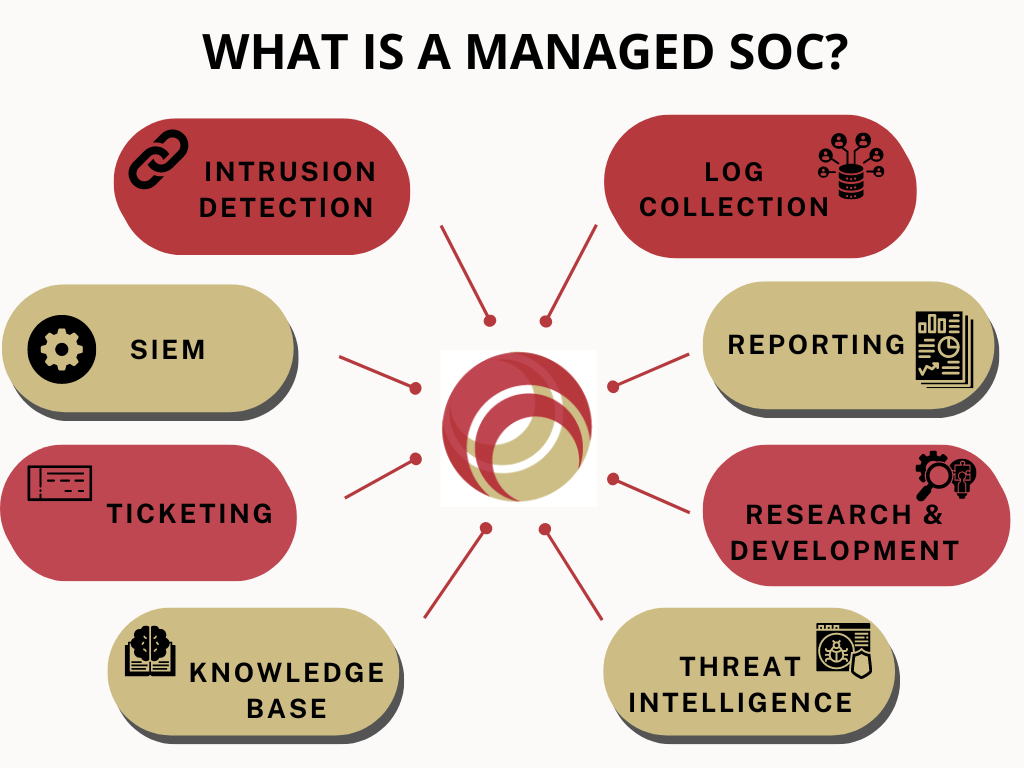
A managed SOC operates by collecting data from across your IT environment, such as logs, network traffic, and other security events. Advanced security tools and techniques are used to analyze the data and identify potential threats, which are then escalated to your team for further investigation and response.

The managed SOC team provides a range of services to help protect your business, including vulnerability assessments, threat intelligence, incident response, and compliance management. 

Services Provided by a Managed SOC 

A managed SOC provides a range of services to help protect your business, including: 

  • Continuous monitoring of your IT infrastructure and applications 
  • Real-time threat detection and alerting 
  • Vulnerability assessments and risk management 
  • Incident response and remediation 
  • Compliance management and reporting 
  • Threat intelligence and analysis 
  • Security awareness training for employees 

Benefits of Using a Managed SOC 

By using a managed SOC, you can benefit from: 

  • 24/7 security monitoring and incident response 
  • Access to specialized cybersecurity expertise and tools 
  • Faster incident detection and response times 
  • Reduced risk of business disruption and financial losses 
  • Improved compliance with regulatory requirements 
  • Enhanced visibility into security events and potential threats 
  • Increased confidence and trust from customers and partners 

Moreover, at Sandra Network, we offer a comprehensive managed SOC service that is tailored to your unique business needs. Our team of experienced cybersecurity professionals will work with you to develop a customized security strategy, that addresses your specific risks and requirements.  

With our managed SOC service, you can have peace of mind knowing that your business is protected around the clock from evolving cyber threats. 

Managed SOC Best Practices 

Working with a managed SOC provider can be an effective way to ensure that your business is protected from cyber threats. To get the most out of your partnership, consider the following tips: 

  • Choose a provider with a strong track record of delivering high-quality services. 
  • Clearly define your security requirements and expectations in your service level agreement (SLA). 
  • Regularly communicate with your provider to ensure that they are aware of your evolving business needs and security priorities. 
  • Provide your provider with access to your IT environment and security policies and procedures. 
  • Conduct regular reviews of the provider’s performance against the SLA and make necessary adjustments. 

At Sandra Network, we work closely with our clients to understand their unique business needs and security objectives and develop a customized security strategy that aligns with their goals.  

We provide around-the-clock security monitoring and incident response, leveraging the latest security tools and technologies to ensure that our clients are protected from cyber threats.  

Our clients have access to a team of experienced security experts who are dedicated to keeping their IT environment safe and secure. 

Understanding the importance of cybersecurity is essential for businesses of all sizes. In addition to utilizing a Managed SOC, there are other measures that companies can take to protect themselves from cyber threats. For example, implementing a password vault and working with a managed service provider can also enhance your organization’s security.

Conclusion

As cyber threats continue to evolve and become more sophisticated, it’s crucial for businesses to prioritize cybersecurity and take proactive measures to protect their assets.

A managed SOC provides businesses with 24/7 security monitoring, access to cutting-edge security tools and technologies, and a team of expert security professionals.

We at Sandra Network are committed to assisting our clients in safeguarding their businesses against cyber threats. If you would like to learn more about our managed SOC services, please visit our website or contact us to schedule a consultation.

Don’t wait until it’s too late – take action now to protect your business with a managed SOC. 

Why Your Business Needs a Password Vault 


Introduction to IT Security

To understand and peel back the layers of the IT security onion, we must start with education. The more you know, the more you can protect your network and business. 

Understanding the Password Vault

Let’s look inside the “Password Vault.” Like the vault we envision in a bank, the password vault protects the goods. The difference is that you can’t physically walk into a password vault on foot, but you can digitally access it. While there aren’t loads of cash and gold bars like in the movies, the data stored in a password vault is worth a lot. 

The Cost of a Data Breach

A data breach can cost your business a pretty penny. The U.S. has the highest data breach cost for the 12th year. It’s not something to brag about, especially with numbers like 5.09 million more than the global average, according to the report, “Cost of a data breach 2022:A million-dollar race to detect and respond,” commissioned by IBM. That is terrifying.

Why Use a Password Vault

Do we have your attention? The software program of your choice that creates your password vault will store and protect all the passwords your employees use while encrypting the data. There is one single master password to then access multiple passwords, which means no one else knows that password, not even the company hosting you. 

The Danger of Weak Passwords

We’ve all been taught not to use the same passwords across various websites or create something too simple like 12345, but people continue to do so. The reasoning may be the ease of remembering one password across multiple platforms, but that’s what’s helpful about password vaults. Weak passwords, or those not well thought out, allow hackers to enter your system. 

The Benefits of Using a Password Vault

Password vaults, (which some call password managers), are the best method of protecting your passwords. There is no method that is 100% foolproof. That’s different from what you want to hear, but using a password vault paired with added security steps significantly decreases your risk of a data breach. 

Look out for our next article, naming some added security steps, coming your way soon. 

Have questions about protecting your IT services? Learn more at SandraNetwork.com or Contact Us.

The Pricier, the Better? – Know the Value Behind the Costing of your SEO Services

The correlation between quality and costing has always been a tricky one. While people know that quality comes at a steep price, they are not always keen on expanding their budget for what may seem like an unnecessary expenditure. But is it necessary that good SEO services are always expensive? Maybe not.

For centuries we have seen the craze for gadgets overpowering the weight of heavy price tags. 

Why?

Because people understand the weight of “value” when they invest their hard-earned money in any commodity. 

That sheds more light on a widely acknowledged fact: “Price is what you pay. Value is what you get.” 

And, unless you can grasp the true potential and far-reaching impact of Search Engine Optimization services, you’ll always have a pre-set notion of giving your money away for a temporary period in another marketing gimmick rather than viewing it as an investment with promising, long term returns. 

When you step into the auction of digital marketing services, there are high chances you might find yourself entangled amidst the diverse comparisons of costing, action plan, service catalog, and the promised results. 

There’s a lot to factor in, and the error bandwidth is negligible. Any mistake in choosing the right Search Engine Optimization Services would put your website in the backseat of the digital market. 

Quality SEO Services = High Pricing? Always?

Indeed, the higher value would come at a decent wallet weight, but choosing wrong in this context would be a greater loss. You can recover from poor traffic, lost rankings, and lesser impressions, but the money lost hits hard.

If you choose a provider with higher pricing, you will pay a lot more upfront. Reliable, innovative, and high-quality search engine optimization services, like high-tech gadgets, are highly-priced.

After all, SEO services aren’t the same as upgrading your monitor.

Five Feet Apart… from the SEO Services with “Crazy Good” Pricing

Sounds Weird?

Of course, it would. 

But alarms are supposed to blare when you land something too good to be true. 

If an agency provides you with a drastically lower price than others you’ve received, they are probably outsourcing or streamlining much of the work. 

It’s also possible that you’ll be assigned to a manager who manages more than 50 accounts. 

Thus, it allows them to keep costs low, which they pass on to you.

These firms lure you around, promising far-reaching SEO results in a few months (which, by the way, is a cautionary sign since effective SEO takes time). Once the time frame is over and you drop them for poor results, they are already climbing onto another client’s back. 

They won’t skip a beat if your ranking tanks down the same; however, won’t be the scene for you. 

They skim through the tiring process of filtering out the competitors and analyzing their strategies, sketch the latest industry trends, and evaluate your honest standing in the market. 

Know the Value You Want for the Price You Are Getting

Do you want a namesake list of marketing tasks your SEO services are doing for you? Or do you want someone to take ownership and accountability for the long-term results of your business?

When we spend, we want results. Even if your search optimization services haven’t constructed the establishment in all its glory, you’d like to know they are building it wall-by-wall and brick-by-brick. 

Don’t rely on a certain number of blogs and backlinks to prove the tangibility of monthly/weekly results. You want a solid foundation, not a paper wall. Look out whether your SEO partner is spending time and resources on market research, optimizing the ifs and buts of your website, and implementing the fixtures on the road ahead towards a better ranking. 

Sandra Network INC. has a long-standing SEO staff that constantly monitors changes and trends to stay on top of the fast-changing search world. Stay ahead, on the top, and get the right partners for the feat.

Why You Should Look Beyond a Salesperson with Attractive Deals When Choosing Ethernet Service Provider?

The Worldwide web is no more a weapon in today’s increasingly connected world. Conversely, it is a service that assists in the generation of money and employment and makes it accessible to commerce and communication, e-learning, and government activities. It is a basic necessity that has pervaded every aspect of our society. An Ethernet Service Provider connects us to the worldwide network using established telecommunications (plain old telephone service), mobile communications, or stable fiber-optic or broadband service. From that point forward, the ISP is responsible for the immediate, reliable, and secure transmission of your information over the Network.

Likewise, an Ethernet Service Provider is ideal for SMEs and other similar needs where we need high-speed connectivity over a localized domain. It offers a more organized, smaller unit of connected devices.

Thriving in a tight knit community was never this feasible!

What to Expect from your Personal Internet Stewards?

 In the globalization era, role of Ethernet Service Provider is not limited to mere maintenance of connection bandwidth. They are directly responsible for overseeing and scheduling assets, assuring traffic and service delivery, and guaranteeing seamless communication.

Yep! It’s a bigger deal than it looks.

While the security of the communications infrastructure is widely believed to be strong, recent incidents reveal that the pipelines and tools on which Internet users rely on, like Ethernet Service Providers are growing more vulnerable to pilot error and cyber espionage attacks.

Here are some of the unwritten yet well-established ground rules that an Ethernet Service Providers must adhere to:

  • Create a healthy, safe, and competent channel for the end-user to harness maximum traffic and other immediate requirements.
  • An Ethernet Service Providers must educate the user about the latest, authentic, and strictly officially authorized routing information and aid in the process of implementation.
  •  They also enable their clients to connect with each other by offering Internet email accounts, frequently with many email addresses, when at the convenience of the consumer.
  • Some Ethernet service providers do feature phone and television services, as well as personal websites and home pages, regardless to say the user’s whim.
  • It’s their duty to report malicious and anonymous cyber security threats with relevant statistics supporting the claim to public knowledge, at the same time not creating a sense of mass hysteria.
  • The responsibility to educate their audience about the darkest and the most renowned cyber and malware threats falls upon the shoulders of Wide Area Network Service providers. 
  • When in the process of optimizing and scouring the customer’s existing IT infrastructure, if the professionals come across any web infection, they must immediately put that in the client’s knowledge. It helps both parties when the employers know what they can expect from the services and practices they should refrain from. 
  • A non-negotiable prospect of Ethernet Service Providers is they should be available on an immediate basis in case of emergencies and be equipped to fend off imminent danger.

You are not basic, neither is your business, and nor should be your internet solutions.

Sandra Network can assist your business in developing, selecting, and implementing the optimal carrier services solutions for businesses through our world-class ethernet connectivity services as your respected IT and telecom representative.

High Loads due to Poor Server Management Services are Losing you Big Money

Server management services are indeed components of a broad terminology, and the operations offered by different providers may differ. Regardless, server management is acquiring management or access to a physical, virtual, or application server to perform specific managerial or maintenance tasks.

It also provides server monitoring and awareness, which allows you to see how a server is performing and how you may improve it. Evaluating and fixing high server loads fall under the said category.

High load on your servers Defines the Need of Server Management Services

It’s one of those issues that’s the equivalent of a server outage and puts your service level agreement and your company’s reputation on the line. No serious busines owner can afford to allow their servers to undergo the downtime due to high load and server down troubles in the competitive hosting sector.

Clients are affected by poor loading speed, inaccessibility, and numerous errors cropping up on websites with database related faults as a result of the excessive load. Your poor investment or choice of Server management services starts losing you potential revenue by the minute.

Furthermore, you begin to receive complaints from your end customers who are running mission-critical apps and doing live internet transactions.

And can you really blame them?

It’s 2022, Time IS Money!

Customers discover email difficulties and various mistakes while uninformed of what is going on, disrupting their normal company operations. Now, the question is, what do you do when you encounter high load problems?

Identifying the Cause of High Load on your Cloud Managed Servers

  • Overloaded server
  • Spamming
  • Hard disk performance
  • Process & Cron job scheduling
  • Database performance.
  • Viruses and malware’s

Only when you know what you’re up against, can you fix the real problem. A competent server management services partner would know where to look, so really, it’s about expertise and experience.

A Methodological Approach to Fend Off High Load Issues

  • Select a Good Cloud Based Server/ Server hardware: The server’s hardware has a significant impact on its performance.

You’ll need to figure out how many accounts/domains you’ll be hosting on your server before placing a purchase.

If you have several accounts on your server, you will run out of resources. Only once you have adequate resources on your server does optimization benefit. Start harnessing the power of quality cloud managed services, which set resource limits per account.

  • Select a Good Hard Disk Drive: SSD (Solid State Drives) are usually recommended by experts since they operate far better than standard SATA discs.

On many forums and websites, you can understand more about SSD discs. The majority of servers now come with SSD drives are much less expensive than traditional disc servers.

  • Strategize your Backup Scheduling: A capable Server Management Services will configure the backup to execute within the off periods, as the backup would be completed faster because the server’s capacity will be primarily free.

You can figure out how your server is used and when your backups should be done.

  • Don’t Lose out on Tracking the Mail Server: The main issue here is that you won’t be able to browse the shell if your server is under heavy traffic. So, what are your options now?

Adding monitoring notifications to your monitoring tool is the best option.

  • Recognize security threats such as viruses and malware: Viruses and malware can attack servers hosting unsecured websites like WordPress and e-commerce applications.

Websites running older versions, insecure third-party plugins, and other factors could be to blame. Outgoing DDOS attacks can be carried out using insecure websites, resulting in excessive CPU consumption and network traffic. Ensure your Cloud Managed Servers are well protected against potential risks.

Sandra Network has been churning the technological innovations to bring the most reliable Server Management Services onboard. Consult them today for expert opinions on IT operations.

The “Underworld” of the Internet – The Dark Web

Sandra Network Delivers Peace of Mind with Dark Web Monitoring 

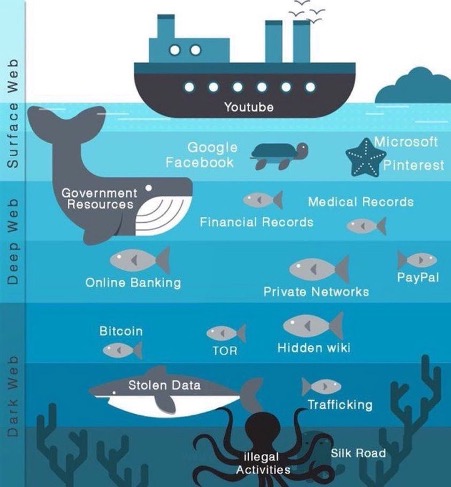
What is Dark Web?

The Dark Web is the part of the internet that is not visible to search engines. It requires users to use a special browser called Tor. This browser allows users to browse anonymously creating an environment where it’s easy for the unsavoury to lurk but also unsafe for those who aren’t aware of its dangers.  

A lot of information found on the Dark Web is hidden and although some of it is safe, much of it is not. If you don’t understand the Dark Web or how it works you may not be aware of how harmful it can be to you and your business. Precautions must be taken to protect your confidential information from being found on the Dark Web.  

How is Dark Web different from the Web?

The Web is a vast network of interconnected computers all around the world. Through the Web, people can share information and communicate with other people across the globe using the internet. Information on the web is indexed by search engines making it easily accessible to anyone with an internet connection irrespective of geography. On the other hand, Information on the Dark Web is not indexed and stays hidden requiring special privileges to see and access. This part of the web, the Dark Web is the unchartered part of the web that’s existed since March of 2000. 

The Dark Web is a hotbed of dark things! 

As you can imagine, many cybercriminals love to prowl this space, looking for easy prey.  

How can this parallel space exist? It exists because online content can be encrypted and hidden online. Because the information is hidden, it never gets indexed and therefore does not appear on search engine result pages like Google or Bing. And cyber criminals love the Dark Web because they can be anonymous while using it!  

You do not want your business or employees associated with this unsafe environment. If they are, there is the potential for your company’s (or client’s) information to find its way into any of the many “darknets.” Once it is found on the Dark Web, there is no telling how much damage you, your employees, or your clients may experience. Fortunately, we can find if your information is on the dark web, and work with you to remediate it. 

On the dark web, anything and everything can be found. This includes illegal drugs, bank account and Social Security numbers, passwords and all sorts of your PII:  sensitive and confidential information. Hackers are out there trolling for any vulnerabilities they can find and are constantly collecting this data off unsecured websites and using the information for their own financial and illegal gains.  

Cybercriminals go there because they know breached data eventually finds its way to the Dark Web. It comes from compromised credentials, third party leaks or ransomware dump listings. Once this breached data is discovered, it becomes an invaluable source of revenue. All kinds of illegal activity and discussions happen here including threat intelligence to pre-plan attacks and look for other vulnerabilities and ways to exploit information.  

Sandra Network will work with you and your organization to give you unparalleled visibility into dark web risks within your organization. We will help you become aware of threats to your organization and enable your team to take actions on these threats before they become incidents. 

What are the risks?

Those who dive into the Dark Web will find a veritable eCommerce market for things that are not available via regular methods. For instance, you can’t buy a database filled with usable credit card or debit card numbers on Amazon; you can’t head to Etsy and purchase thousands or even millions of user’s credentials for bank accounts; you can’t point your browser to Walmart.com and click to add a list of valid social security numbers into your shopping cart. Unfortunately, you can buy these things on the Dark Web. And because you can buy this type of information on the Dark Web, including your sensitive information, precautions must be taken. We can help train your employees on how to securely navigate websites to mitigate the following types of threats found on the Dark Web such as: 

  • Malicious software 
  • Cyberattacks 
  • Ransomware 
  • Phishing malware 
  • Trolling 

You need to ensure your employees’ credentials are not on the dark web, exposing your company data.

End-user protection against exploitation in the dark web 

Regardless of being a business, parent, or any other user of the web, you will want to take precautions to keep your information and private life off the dark web. 

Identity theft monitoring is critical if you want to keep your confidential information from being misused. All types of personal data can be distributed online for a profit. Passwords, physical addresses, bank account numbers, and social security numbers circulate on the dark web all the time. 

The dark web is home not only to hackers looking to steal our info but also to criminals who sell-off this illegally obtained data that includes sensitive personal records. Ensure your employees do not fall victim to phishing schemes where passwords, credit card numbers, social security numbers, etc. are acquired and sold. Malicious actors will use this type of information to engage in financial theft, breach your online accounts and even to harm your credit. Plus, leaks of personal data may damage your business’s reputation once discovered or be used for “social” fraud.  

Antimalware and antivirus protections are equally crucial to prevent malicious actors from exploiting you. The dark web is filled with information theft from malware-infected users. Attackers can use tools like keyloggers to gather your data, and they can infiltrate your system on any part of the web.  

Secure your business with Sandra Network. We uncover your compromised credentials in Dark Web markets, data dumps, and other sources. We can quickly alert you to trouble, allowing you to mitigate the problem and giving you the advantage to act before cybercriminals have a chance to act.  
 

Contact Us today for a free, one time, Dark Web scan to see if your organization has exposed information. 

Why Your Company Needs Managed Services?

Where would we be today without technology? While the pandemic has kept us apart, cloud computing, the Internet of Things (IoT) and other types of tech have made it possible for us to stay connected with colleagues and customers, facilitated medical treatment from a distance and so much more. 

Information TECHNOLOGY drives innovation and innovation is the path to business success. Innovation in business has the same impact that steam had on the industrial revolution. Subsequently, it’s no surprise that many organizations plan to invest more in IT this year despite the economic downturn caused by COVID-19. According to a press release by Gartner,

IT spending worldwide in 2021 is expected to reach $3.9 trillion. This is a 6.2% increase compared to 2020.

This increase is likely due to the continuing need to accommodate remote workers, enable virtual learning and the advancement of additional digital transformation initiatives. In a recent technology survey of 1000 companies in North America & Europe, 

44% of businesses planned to increase their IT spending budget in 2020. In North America, the most common factors for this increase as reported by respondents was their need to upgrade outdated infrastructure (71%) and increased security concerns (50%) – Spiceworks 

Many small and medium size businesses operate on a strict budget and do not have the luxury or resources necessary to meet all these operational IT demands. Servers and the staff to maintain them is expensive. A managed service provider maintains and manages all needs of your IT infrastructure for only a fraction of the cost of servicing and maintaining it. If you do choose an in-house IT employee they may not have the resources necessary and the outcome is often a compromise to the quality of support or a disaster resulting in downtime, security issues, limited support, and reduced productivity. Outsourcing these activities to a reputable Managed Service Provider (MSP) helps business owners avoid these and other IT related issues, some they may never even have considered. 

With IT spending among small to medium-sized enterprises (SMEs) predicted to enjoy a significant increase, the role of managed service providers (MSPs) is becoming increasingly important as these businesses seek to adopt managed services. The answer to the question Why your business needs Managed Service Provider?, can come in the form of an explanation of work that is done by a MSP.

A managed service provider is simply your network administrator, security consultant and disaster recovery expert, all rolled into one. They are there to manage your IT infrastructure and user interface within your systems.  Your savings can then be used on better revenue producing activities. Your business also benefits as you can now focus on your core competencies and business goals while your MSP manages your IT infrastructure. 

Managed Service Provider - Services

Services offered by Managed Service Provider 

Most MSPs offer a wide variety of IT services in multiple configurations. They work with your company to plan, implement and manage various IT functionalities such as User and Workstation Management, Web Servers, Email, Server Monitoring and more.  

If you choose to work with Sandra Network, we will review every corner of your company’s current IT infrastructure. Once reviewed, we will put together a working plan of action to ensure you are always up to date, secure, and supported. Our goal is to make sure your technology infrastructure is running smoothly and efficiently in order to support your business goals. Our proposal will include the specific IT components we recommend and the steps necessary to set them up. Once our proposal is accepted, we will on-board your company, implement the steps and begin managing your IT services giving you the full support of an IT Helpdesk without the costs of a full-time IT department. 

Ready to transform your business? Let’s get started.

Deploy Office 365 ProPlus to Remote Workers

Remote-worker

Distributing Office 365 to remote workers has become a challenge for IT admins ever since the pandemic has hit the entire globe. IT admins face the continuous challenge of deploying Office 365 to remote workers without exceeding the limit of the company’s VPN connections. However, with the tactical approach and strategic methods, IT admins can get a sigh of relief in releasing the VPN traffic by content distribution to the Microsoft Content Delivery Network. There are various strategic solutions to deploy Office 365 to remote workers without saturating the company’s VPN connections such as Intune and Windows Autopilot. However, they are extensive processes, and to save you time, we bring you easy-to-do steps to resolve this problem.

Steps for Office 365 Deployment:

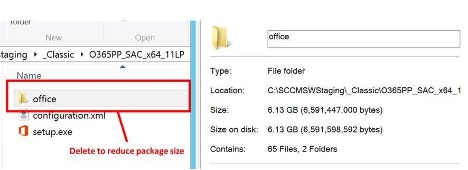
Manage Deployment Package: In order to let remote workers use their local internet connection to access the source file, the source file needs to be removed from the Configuration Manager application. To do so, open the Configuration Manager application, go to the folder that has your software sources, select the “office” folder, and delete it.

steps to manage Deployment Package
Screenshot showcasing steps to manage Deployment Package

The above screenshot showcases the deployment package that includes 11 Language packs, striking the size up to 6+ gigabytes. You must keep the setup.exe along with other configuration files located in the folder. This decreases the size of the deployment package to less than 10 megabytes. It saves on the VPN connections to a great extent.

Note: Use a built-in wizard if you do not have an Office 365 installation package. To adjust the handling of languages, incorporate MatchOS or MatchPreviousMSI. Once the setup is done, go through the steps mentioned above to deploy Office 365.

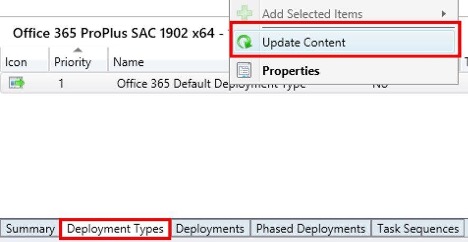
  1. Revise Content Sources: In the case of the syncing of application and distribution points, there must be a larger package cached. You must sync a smaller deployment package to devices. To do so, go to Software Library then select Application Management. After that, click Applications and select your application. Switch to the Deployment Types tab then right-click the appropriate entry, and choose Update Content.
Steps for Updating Content Sources

This step will help re-sync any changes to the Distribution Points. Therefore, the smaller deployment package gets ready to sync to devices.

  1. Check VPN Configuration and Deploy: Once the setting has been changed to the smaller deployment package through Configuration Manager, the installation starts of Office 365. The source files are directly downloaded from the Microsoft CDN.

The point that needs to be emphasized here is that you must ensure that your devices are able to reach out to those endpoints directly and are not blocking the VPN tunnel. In case, the VPN tunnel is backhauled, enable so-called VPN split-tunneling. Also, the endpoints required for Office 365 ProPlus source file download are listed at Office 365 URLs and IP addresses.

  • Use Peer Caching to reduce On-Prem Traffic: The step is not mandated but highly suggested.

It is highly recommended to configure and enable Delivery Optimization for Office along with Connected Cache in a combination in case of the usage of the same deployment package by remote and on-premises workers, This enables on-prem devices to distribute content excluded in the deployment. Thus, it greatly reduces the load on the corporate internet connection.

The above steps not only help in deploying Office 365ProPlus but also let IT, admins take control of what happens and when with the help of enterprise management solutions like Microsoft Endpoint Configuration Manager. It is also called as System Center Configuration Manager (SCCM).

Other than that, deploying Office 365 ProPlus allow remote users to use their local internet connection rather than Configuration Manager Distribution Points over VPN connections.

Deploy Office 365 ProPlus so that your VPN connection does not burn out. It becomes utmost necessary to keep yourself updated on the latest trends of Office 365 so that you fully understand and use its amazing features to benefit yourself especially in the time of Covid when all the work is being done remotely.

If you are looking for some professional guidance to help you set up Office 365 and deploy Office 365 ProPlus to your remote workers, give us a shoutout. We provide professional solutions to our clients and complete training to make you feel comfortable in using Office 365. You have any questions, problems, doubts, call us or drop us an email. Or you can just head to Sandra Network. We will be at your service.

Keeping users safe and productive with Microsoft 365 Apps for Enterprise

Microsoft Office 365 for enterpriseIt has always been a battle for enterprises to maintain a balance between productivity and security. Organizations are always worried about the trade-off between worker productivity and security since both can be compromised leading to complex problems for organizations. To resolve this issue for enterprises, Microsoft Office 365 has introduced apps such as “Safe Documents and Application Guard. These apps build secure productivity, helping organizations stay both productive and secure at the same time by protecting their information and limiting risks while allowing them to focus on strategic initiatives and innovation. 

What is Safe Documents? 

About Safe Documents
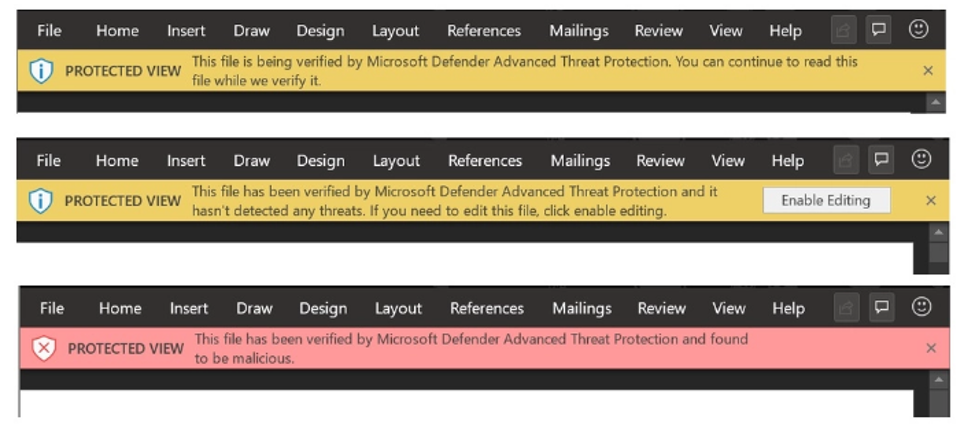
Safe Documents identifies that a user had opened a malicious file and prevents them from exiting the Protected View container

With Safe Documents, your files are automatically protected against known risks and threats before you ever open them. Moreover, users do not have to worry about deciding whether a document can be trusted, they can simply focus on getting work done. Safe Documents brings the power of the Intelligent Security Graph down to your system and assesses if document is safe. This safe and seamless connection between the desktop and the cloud makes the user’s workflow more fluid while keeping your network more secure. 

What is an Application Guard? 

 Application Guard
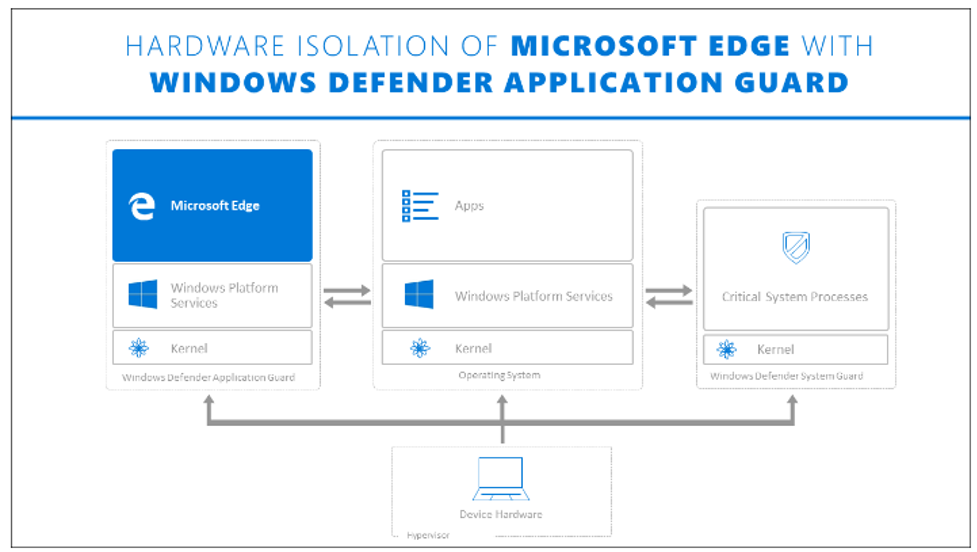
Windows Defender Application Guard

Application Guard ensures that desktop users are safe and productive. With an upgrade to protected view, Application Guard blocks the attacker’s access to memory, local storage, installed applications, corporate network endpoints, or any other resources that might interest the attacker. Application Guard lets users open an untrusted Word, Excel, or PowerPoint file, make changes to it and save it, all while being protected with hardware-level security.  

How these Apps help Enterprises like Yours? 

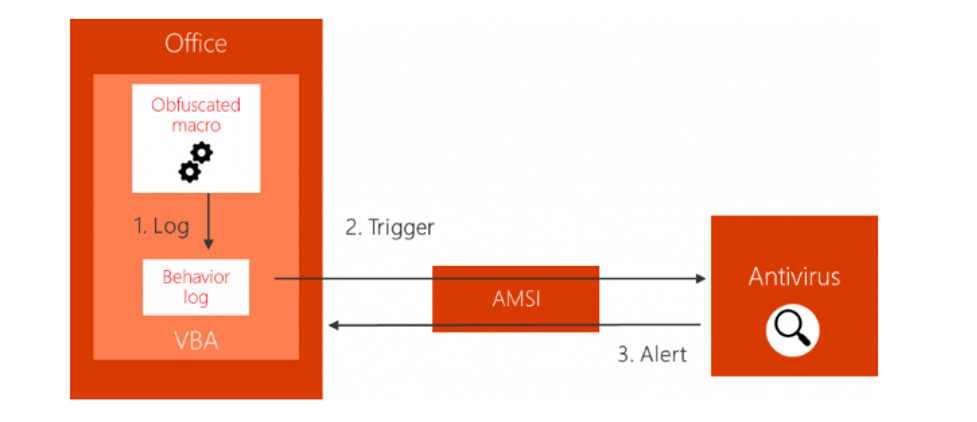
Users are secured by Default: The release of Antimalware Scan Interface (AMSI) integration for Excel 4.0 (XLM) macros provides a security solution to the systems. The open interface of AMSI is widely used on Windows 10. Microsoft Defender for Endpoint incorporates AMSI and machine learning to fight and curb script-based and file-less threats. Office and AMSI integration protect against script-based malware. The integration of Excel with AMSI detects logging macro behavior, identifies suspicious behavior, and stops a malicious macro upon detection. The user is immediately notified by Excel when malicious activity is detected. The application is shut down in order to avoid any further damage.  

The Working of Antimalware Scan Interface


Productivity and Security Go Hand-in-Hand:  Enterprises are always looking for ways to keep their productivity high while staying secure. Therefore, they are always in search of procuring applications that will work seamlessly without affecting user productivity. 

Now, with Microsoft Office 365 Apps, securing files without hampering user productivity has become achievable. Not only will productivity boost, but Security Policy Advisor will also measures how enterprises use Microsoft 365 Apps and then recommend specific policies for enhancing an organization’s security profile. These recommendations are solely based on Microsoft’s best practices. With the use of Security Policy Advisor, IT admins and enterprises can work together to view intelligent security policy recommendations based on the Office app, which features their usage, to better understand behaviors before changing any policiesUsers will have greater confidence knowing these policies are in place helping them to choose appropriate behaviors in their environment. It also lets enterprises monitor policy health enabling them to analyze the impact on user productivity, highlighting areas worth attention, and then make any necessary changes. 

Work and Save Untrusted File without Worrying: With so much pressure to get their work done, users often ignore Protected View and dismiss it without considering whether a document is safe to openThis leaves your workers and your organization vulnerable to malware and an easy target for attackers. Also, sometimes users choose not to use Application Guard protection without properly considering the consequences, even though the use of Safe Documents and Application Guard allows users to work on an untrusted file and save it without affecting their security. Safe Documents and Application Guard are two features in Microsoft 365 E5 or Microsoft 365 E5 Security that incorporate Microsoft’s deep knowledge of risks and brings these features to the desktop. Using Safe Documents enables users to open untrusted files in Protected View. On the other hand, Application Guard is an extra layer of security that lets documents or files go through an additional step where the document is uploaded and scanned by Microsoft Defender for Endpoint. 

Document opening in Application Guard
Microsoft 365 Apps lets you know when an untrusted file is being opened with Application Guard

To summarize, Safe Documents automatically verifies documents against potential risks and threat before allowing users to leave a protected environment like the Protected View or Application Guard. Therefore, it would be safe to say that this unique approach to Microsoft Office 365 empowers enterprises all over the world in terms of security and productivity.  

What are you waiting for? Set up Office 365 for your business and keep it safe while watching productivity soar. If you are looking for advice or professional help setting up Office 365 for your business, look no further, you’ve come to the right place. Sandra Network is a one-stop solution. We offer great advice, answer all your questions, recommend the right solution, set it up and provide guidance to help you boost your productivity with the amazing features of Office 365. Don’t delay, head to Sandra Network and get a head start by browsing some of our professional training videos. Then call or email us to schedule an appointment We look forward to chatting with you soon.  

What is a Virus?

[et_pb_section fb_built=”1″ admin_label=”section” _builder_version=”3.22″][et_pb_row admin_label=”row” _builder_version=”3.25″ background_size=”initial” background_position=”top_left” background_repeat=”repeat”][et_pb_column type=”4_4″ _builder_version=”3.25″ custom_padding=”|||” custom_padding__hover=”|||”][et_pb_text admin_label=”Text” _builder_version=”3.27.4″ background_size=”initial” background_position=”top_left” background_repeat=”repeat”]

An email virus comprises of malicious code that is distributed in email messages, and this code can be activated when a user opens an email attachment, clicks on a link in an email message, or interacts in a totally different way with the infected email message.

Email viruses are mostly spread by causing the malicious message or attachment to be sent to everyone in the victim’s address book. Recipients can find it difficult to identify specific email messages containing malware since these messages appear as if it has been sent from a known and trusted sender. This is true in the case of phishing attacks carried out to further business email compromise attacks.

Types of Email Viruses

Ransomware: Mostly delivered through emails, ransomware encrypts the victim’s data and then demands a fee to restore it. The motive for ransomware attacks is mostly monetary.

Phishing: Phishing employs manipulation to trick victims into revealing logon data or other sensitive information that criminals use or sell for malicious purposes. Generally, a phishing attack comprises of an authentic-looking sender and a message that is socially engineered. The recipients who believe that the message is from a legitimate source and end up opening infected attachments or clicking on malicious links.

Spoofing: Email protocols lack efficient mechanisms for authenticating email addresses and hence hackers are able to use addresses  that are very much like legitimate ones, tricking victims into believing that fraudulent emails they receive are from a trustworthy individual.

Whaling/Business Email Compromise: Business Email Compromise (BEC), also referred to as “whaling”, target’s an organization’s biggest fish. In this type of social engineering scam, an attacker sends an email to someone in the organization that has the potential to execute a financial transaction. The email appears as if it is from the CEO or another authorized individual, and demands for an instant financial transaction such as a vendor payment, wire transfer, or direct deposit.

Spam: Spam continues to be a major challenge for organizations even though a number of attempts have been made to filter out unwanted emails. While the most normal type of spam is simply considered a nuisance, spam is also frequently employed to deliver malware. For instance, ransomware is most commonly delivered through spam and thus alerts all organizations to carefully assess spam for dangerous intent.

Key Loggers: Criminals behind the most damaging data breaches always utilize stolen user credentials. A keylogger is considered to be one effective method used by criminals to obtain passwords and IDs. This is mostly delivered by emails when victims unknowingly click on a malicious link or attachment.

Zero-Day Exploits: A zero-day vulnerability refers to a security weakness that is not known to the software developer. The security hole is exploited by hackers before the vendor has developed a fix. Zero-day attacks are mostly delivered through malicious emails, and hackers use them in order to gain unauthorized access and steal sensitive information.

Social Engineering: Social engineering is used by cybercriminals in order to build trust before stealing confidential data or user logon credentials. In social engineering attacks, a computer criminal acts as a trusted individual and engages in a conversation to gain access to a company’s network. The attacker tricks the victim into disclosing passwords, IDs, and sensitive information, or forces them to unknowingly perform a fraudulent transaction.

How To Stop spam and Email virus

Consider employing the tips given below to prevent an email virus from infecting your client device or network:

  • Use antivirus software.
  • Scan all attachments for malware.
  • Refrain from opening potentially dangerous attachments, such as PDF files, that have been included in email messages from unknown senders.
  • Don’t click on links provided via email messages, and watch out for phishing email messages that appear to be sent from authorized sources.
  • Keep the mail client, operating system, and web browser updated and patched.
  • Do not open any executable files included as email attachments. Attackers may try to disguise these files by naming them with two extensions, such as image.gif.exe, but .exe is indeed the sign of an executable that will run automatically.
  • Don’t give out your email address to websites that are unsecured. Even if the site holds up, malware and viruses can still snag your address, making it easy for them to send a fake email with a virus your way.
  • You can stop spam and email virus attacks by getting a text preview in your chosen email service. Content previews give you a glance of the content in the email by minimizing your need to click on the email in order to ascertain its subject matter.
  • If an antivirus program sends you an email telling you that your computer has been infected, always make sure to verify the information via your antivirus software before opening the email. These programs are less likely to correspond via email than interface messages.

3 Ways an Email Virus Infects Computers

Individuals and institutions need to invest more resources into email protection to keep email virus at bay. Although an email virus looks simple, one must not underestimate its capacity to damage your computer. More email protection is necessary considering the possibility that a cybercriminal is behind the email virus.

In order to gain more email protection, consider what parts an email virus may be hiding in an email so you can guard yourself accordingly.

How an Email Virus Is Delivered to Your Email

Top 3 Ways an Email Virus is Delivered to your Email

  • An Email Virus in Phishing Email
  • Email Virus in an Attachment
  • An Email Virus in the Body of the Email

1. An Email Virus in Phishing Email

An email virus may only be the beginning of a targeted effort to gain your personal information. Some hackers could be aiming for sensitive data in your account or in some database you have credentials. Aside from upping your email protection, you will need to increase your vigilance as well. The hackers may have done research and used social engineering to design a phishing email to get your data.

In this case, email protection needs to be complemented by self-awareness and gut instinct. If you don’t know how a particular company got your email or you don’t know the person emailing you, it’s better not to touch the message as it may contain an email virus.

Also pay attention to the web address inside the email and remember if it’s the same one you log into. If there’s a change in the email address, verify with the institution if they had their domain changed. Sometimes changes in the address are so minute so you will need to be more detail oriented than normal. A little care is better than additional email protection.

If you’re aware that the email is a hoax, kindly delete it and don’t pass it along anymore. Start a practice of being very selective of what messages you pass along so you become a part of other people’s email protection in a way. This will also lessen the chance for an email virus to spread.

2.Email Virus in an Attachment

The most common way an email virus gets delivered is through the email attachment. Again, for better email protection against an email virus, you will need to be vigilant and do not open the attachment if it is not from someone you trust. And even if you trust the sender, you will still need to check the file name of the attachment.

Email virus often take the form of an executable file, therefore be very suspicious of anything that ends with the following extensions:
.dll
.exe
.com
.pif
.js
.scr

or anything that might have scripts in it: .doc
.dot
.xls
.xlt

If you have antivirus on your computer, you can download the message but do not open it. Get your antivirus scanner to check for email virus. This can help clean the file for you. However, for the best email protection, your company or yourself can get Comodo’s Antispam Gateway. This particular software weaves three layers of email protection in a command console, containment technology which isolates email virus and let’s it run from a safe environment inside your computer, and advanced filters and algorithms which are wired to weed out threats inside your email. What better email protection is there?

3. An Email Virus in the Body of the Email

An email virus can likewise be embedded inside the body. However, much like email virus in attachments, email virus in the body also disguise themselves rather well. There are two ways they can compromise your email protection. First, they can disguise themselves as links. You may think you are safe inside your email account so you don’t need email protection anymore. That’s wrong. First, if you click on a link, you can end up opening an infected site which will install an email virus in your computer.

Second some email virus may pose as simple HTML code. So the best email protection advice in this scenario is to avoid enabling HTML in your account and stick to the standard view. That way an email virus will not have the chance to install itself.

Now you know where an email virus can be placed within your email. You’ll get the best level of email protection as long as you pair any solution you have with common sense and vigilance. This way even if you have a full suite of email protection software installed in your computer, no email virus will go past you in case your software fails. The best email protection is still you.

[/et_pb_text][/et_pb_column][/et_pb_row][/et_pb_section]